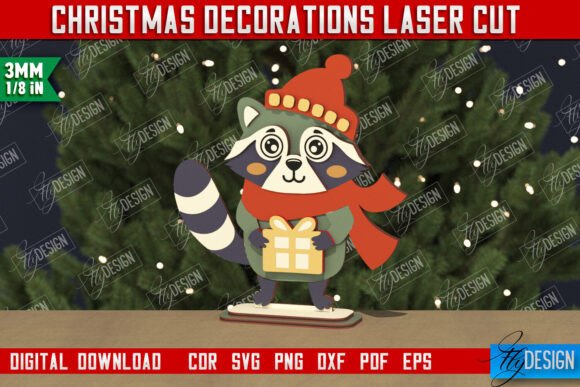
Crafting Holiday Magic: The Ultimate Guide to Laser-Cut Raccoon Christmas Decorations
The holiday season is a time when creativity meets tradition, and nowhere is this more evident than in the world of handmade Christmas decorations. In recent years, there has been a significant shift away from mass-produced plastic ornaments toward unique, personalized items that tell a story. One of the most charming trends emerging in the DIY and maker communities is the use of laser cutting machines to create intricate wooden figurines. Among these, the Raccoon Christmas Figurine has captured the hearts of crafters and gift-givers alike. This article explores the significance of these decorative pieces, how digital files power modern crafting, and why this specific project is an excellent choice for both beginners and experienced makers.
The Rise of Digital Crafting in Modern Decor
Gone are the days when creating professional-looking holiday decor required hours of manual carving or expensive molding equipment. Today, technology has democratized creativity. With the advent of affordable laser cutting machines, individuals can transform simple sheets of wood, acrylic, or cardboard into stunning table statuettes and hanging ornaments. The process begins not with a saw or chisel, but with a digital file.
When you purchase a product like the Christmas Decorations Gift Idea Decorative Figurine, you are essentially buying the blueprint for creativity. These digital products typically come in a zip archive containing multiple file formats, ensuring compatibility with various software and hardware setups. Understanding these files is the first step in mastering modern crafting.
- SVG (Scalable Vector Graphics): Ideal for web-based design software and many laser cutters, though sometimes prone to dimension distortion in specific programs.
- DXF (Drawing Exchange Format): Often the preferred choice for engineering and precise laser cutting, especially when using software like Lightburn.
- EPS (Encapsulated PostScript): A standard vector format widely used in graphic design applications like Adobe Illustrator.
- PNG (Portable Network Graphics): Useful for previewing the design or using with CNC routers that utilize image-based paths.
- PDF (Portable Document Format): Great for quick viewing and printing templates for manual tracing if needed.
Why the Raccoon? Symbolism and Style
You might wonder, why a raccoon? In the context of Christmas decorations, animals have always played a pivotal role, from reindeer pulling sleighs to owls perched on snowy branches. The raccoon, with its distinctive masked face and curious nature, adds a touch of whimsy and woodland charm to any holiday display. It represents adaptability and intelligence—traits that resonate well with the DIY community.
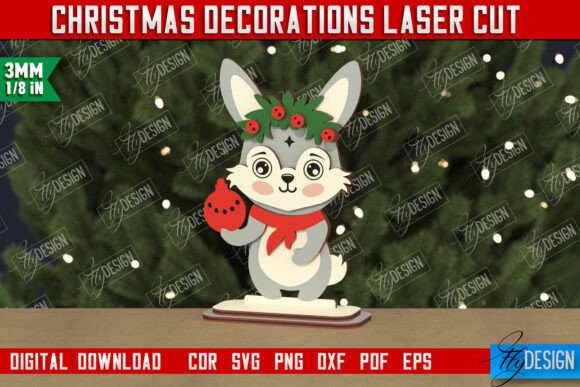
A decorative figurine of a raccoon dressed in holiday attire serves multiple purposes. It can be a centerpiece on a dining table, a cute addition to a mantelpiece, or a heartfelt gift idea for a friend who loves nature or woodworking. Unlike generic store-bought items, a laser-cut raccoon allows for customization. You can choose the type of wood, apply your own stain or paint, and even add personal touches like glitter or fabric accessories.
Navigating Technical Details for Perfect Results
While the creative possibilities are endless, the technical execution requires attention to detail. When working with digital files for laser cutting, understanding how your machine interprets data is crucial. Most professional CNC files and laser designs utilize a color-coded system to distinguish between different operations.
In the specific case of the raccoon figurine mentioned, the design follows a standard industry convention:
- RED line: Indicates where the machine should CUT all the way through the material. This creates the outer shape of the raccoon and any internal slots for assembly.
- BLACK line: Indicates where the machine should ENGRAVE. This is used for adding details like facial features, fur texture, or holiday patterns without cutting through the material.
It is vital to ensure that your cutting machine and software are compatible with these settings. A common misunderstanding among beginners is assuming all vector files behave identically across all platforms. This is not the case. For instance, users of Lightburn, a popular software for controlling laser cutters, often encounter issues where the dimensions of the final product do not match the original design. This distortion frequently happens when using SVG file formats.
To mitigate this, experts suggest using the DXF file format when working with Lightburn. DXF files tend to preserve scale and dimension more accurately, ensuring that your table statuette fits together perfectly without gaps or misalignments. If you find yourself struggling with file compatibility, remember that many creators offer support. Reaching out to request a different file type or a specific size of a PNG file can save hours of frustration.
The Practical Relevance of DIY Holiday Projects
Why go through the trouble of making your own decorations when you can buy them? The answer lies in the value of the process itself. Engaging in laser cutting projects fosters a deeper connection to the objects we surround ourselves with. It transforms the act of decorating from a passive consumer activity into an active creative endeavor.
From an educational perspective, these projects are fantastic for learning about geometry, material science, and digital design. For teachers and parents, guiding a child through the process of selecting a file, choosing material, and operating a laser cutter (under supervision) provides hands-on STEM learning. For businesses, offering custom laser-cut ornaments can be a lucrative niche during the holiday season, appealing to customers looking for eco-friendly and locally made goods.
Furthermore, the flexibility of digital files means that one design can yield countless variations. By simply changing the material from plywood to bamboo, or adjusting the engraving depth, you can create entirely different aesthetics from the same zip archive. This adaptability makes digital crafting a sustainable choice, as it encourages repairing and upcycling rather than discarding.
Building a Broader Understanding of Maker Culture
The popularity of items like the Raccoon Christmas Figurine is a testament to the growing "Maker Movement." This cultural shift emphasizes learning by doing, sharing knowledge openly, and utilizing technology to solve problems or create art. When you download a set of files and bring them to life, you are participating in a global community of creators.
Common assumptions often suggest that laser cutting is only for industrial professionals. However, the reality is that hobbyists now produce work that rivals commercial quality. The key is patience and practice. Understanding the nuances of file formats, such as knowing when to swap an SVG for a DXF, is part of the learning curve that every maker experiences.
Moreover, the social aspect of this hobby cannot be overstated. Sharing your finished projects online, following creators to see their future releases, and exchanging tips on forums builds a supportive network. Whether you are creating a gift for a loved one or decorating your own home, the satisfaction of holding an object you designed and fabricated is unparalleled.
Frequently Asked Questions and Troubleshooting
As you embark on your project, you may encounter questions. Here are a few clarifications to help you succeed:
- Can I resize the file? Yes, vector files like SVG, EPS, and DXF can be resized without losing quality. However, be mindful that resizing too small may make engraving details indistinguishable, while resizing too large may exceed your machine's bed size.
- What material works best? Birch plywood is a favorite for its smooth finish and consistent layers, but MDF, acrylic, and even leather can work depending on your laser's power.
- My lines aren't cutting through. Check your power and speed settings. Ensure you are using the correct file format (DXF vs. SVG) to avoid scaling issues that might affect focus height.
If you ever feel stuck, remember that communication is key. Many shop owners and designers are happy to assist if you send them a message regarding file types or color adjustments. They want your project to be a success just as much as you do.
Conclusion: Embrace the Creative Spirit
In conclusion, the Christmas Decorations Figurine Raccoon is more than just a cute ornament; it is a gateway into the exciting world of digital fabrication. By leveraging CNC files and laser cutting technology, you can create meaningful, personalized decor that stands out in a sea of generic merchandise. Whether you are a seasoned pro or a curious beginner, the tools and resources available today make it easier than ever to bring your vision to life.
So, as you prepare for the holidays, consider skipping the crowded malls and firing up your laser cutter instead. Download those files, select your favorite wood, and start crafting. And don't forget to follow your favorite creators to stay updated on new designs and inspiration. Happy crafting, and may your holidays be filled with warmth, creativity, and perfectly cut raccoons!