Mastering the Point Star Window Rectangular Favor Box for Professional Results
There is a distinct satisfaction in handing over a gift that looks as though it came from a high-end boutique, especially when you created the packaging yourself. The Point Star Window Rectangular Favor Box offers a unique opportunity to elevate simple treats like chocolates or small cookies into memorable experiences. However, moving from a digital template to a physical product that impresses requires more than just hitting "print." Many crafters and small business owners rush into production without considering the nuances of material selection, scaling, and assembly, often resulting in boxes that look amateurish or fail structurally. By understanding the common pitfalls associated with this specific design, you can ensure your final output is sturdy, beautiful, and perfectly suited for weddings, parties, or retail display.
Understanding the Design Potential
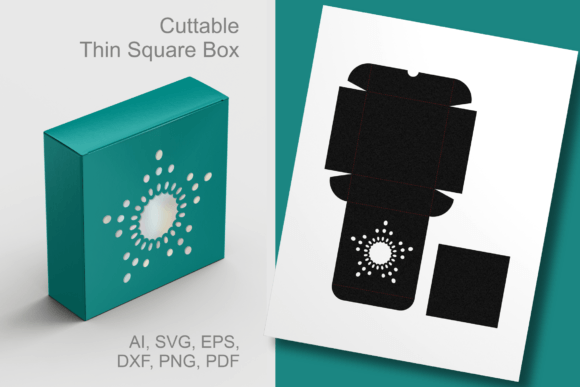
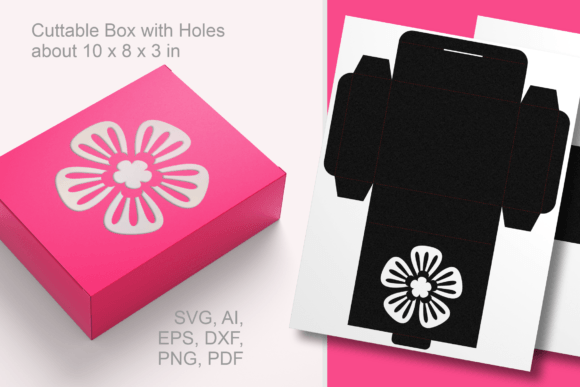
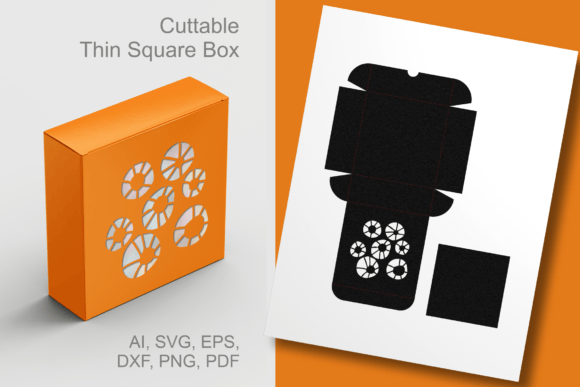
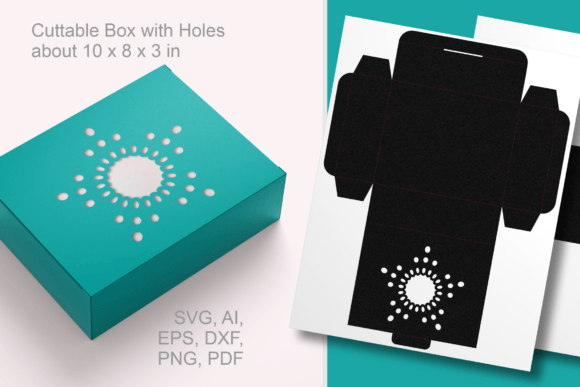
The appeal of the Point Star Rectangular Favor Box lies in its versatility and the intricate paper-cut aesthetic provided by the star-shaped window. This design allows the contents to peek through, creating an immediate visual connection between the giver and the receiver. Whether you are using universal vector files like SVG, EPS, AI, or DXF, or working with high-resolution PNGs, the potential for customization is vast. The standard assembled size of approximately 10 x 8 x 3 inches (25 x 20 x 7.5 cm) makes it substantial enough for generous portions of treats, yet compact enough for table settings. However, the very features that make this box attractive—its cutouts and specific dimensions—can become liabilities if not handled with care.
Avoiding Material Mismatches
One of the most frequent errors creators make is selecting the wrong paper weight. Because this template features a decorative window and requires folding to create a rectangular structure, using standard printer paper (20–24 lb) is a recipe for disaster. The box will lack the rigidity needed to hold its shape, especially when filled with heavier items like dense cookies or multiple chocolates. Conversely, choosing cardstock that is too thick can make scoring difficult and lead to cracked folds, ruining the clean lines of the design.
To avoid this, aim for a cardstock weight between 65 lb and 80 lb (cover stock). This range provides enough stiffness to maintain the box's structural integrity while remaining flexible enough to fold cleanly along the score lines. If you are using a cutting machine, ensure your blade depth is adjusted specifically for this weight. A test cut on a scrap piece of your chosen material is always a wise investment before committing to a full batch. Remember, the quality of the material directly influences the perceived value of the gift inside.
The Perils of Improper Scaling
The template is designed to be adaptable, allowing you to resize it to suit specific needs. While this flexibility is a major advantage, it is also a common source of frustration. Many users resize the file proportionally without realizing that the glue tabs and fold lines may become too small to handle effectively if scaled down too drastically. If you shrink the box to fit a tiny favor, the adhesive areas might disappear entirely, making assembly impossible without adding custom tabs.
On the other end of the spectrum, enlarging the template significantly without adjusting the paper weight can lead to a saggy, unstable box. If you plan to deviate from the standard 10 x 8 x 3 inch dimensions, do so incrementally. Check the width of the glue tabs after resizing; they should remain at least half an inch wide to ensure a secure bond. For significant size changes, it is often better to edit the vector paths in software like Adobe Illustrator or Inkscape to reinforce structural elements rather than relying solely on a uniform scale transformation.
Assembly Mistakes That Compromise Quality
Even with perfect cuts and the right paper, the assembly process can undermine your efforts. A common oversight is neglecting to score the fold lines before attempting to bend the cardstock. Unscored heavy cardstock tends to crack on the outside of the fold, revealing the white core of the paper and detracting from the polished look of the point star design. Always use a bone folder or the back of a butter knife to create a crisp indentation along the fold lines before applying any adhesive.
Another frequent issue is the choice of adhesive. Liquid glues can warp thin cardstock and take too long to dry, causing the box to shift out of square while you wait. Double-sided tape or a hot glue gun (used sparingly) often yields faster and cleaner results. When attaching the flaps, ensure they are aligned perfectly before pressing them down. Once glued, misalignment is difficult to correct without damaging the paper. Take your time during this stage; the difference between a crooked box and a straight one is immediately noticeable to the recipient.
Maximizing the Window Feature
The defining feature of this template is the point star window, intended to showcase the treats inside. A mistake many make is filling the box with items that do not complement the view. If you place dark-colored chocolates in a box with a clear window but line the interior with dark paper, the contents will vanish visually. Similarly, cluttering the box with too many small, irregular items can look messy through the cutout.
To maximize the visual impact, consider the color contrast between your treats, the interior of the box, and any liners you use. Light-colored cardstock inside the box can make dark chocolates pop, while a translucent vellum liner behind the window can soften the look for delicate pastries. If you are using the transparent PNG or JPEG files for printing on clear acetate to create a literal plastic window, ensure the acetate is cut slightly smaller than the opening to prevent it from bulging or peeling off over time.
Final Checks Before Production
Before committing to a large run for a wedding or business order, always produce a single prototype. Assemble one box completely and let it sit for a few hours with weight inside. This "stress test" will reveal if the glue holds, if the lid stays closed, and if the structure supports the weight of the contents. It is far better to discover a flaw in one sample than to ruin hundreds of dollars worth of materials.
Additionally, verify your file formats. If you are sending the design to a professional print shop, confirm whether they require vector files (SVG, EPS, AI, DXF) for crisp edges or high-resolution raster files (PNG, JPEG) for specific printing methods. Sending a low-resolution image for a large format print will result in pixelated edges around the star cutouts, diminishing the professional quality you aimed for.
By paying attention to these details—material weight, scaling logic, scoring techniques, and visual composition—you transform the Point Star Window Rectangular Favor Box from a simple digital download into a stunning tangible product. Whether you are a hobbyist delighting friends or an entrepreneur packaging goods for sale, these precautions ensure your crafting efforts result in satisfaction rather than frustration. Happy crafting, and may your creations bring joy to everyone who receives them.